
Manage Policy Sign-Offs from ChatGPT
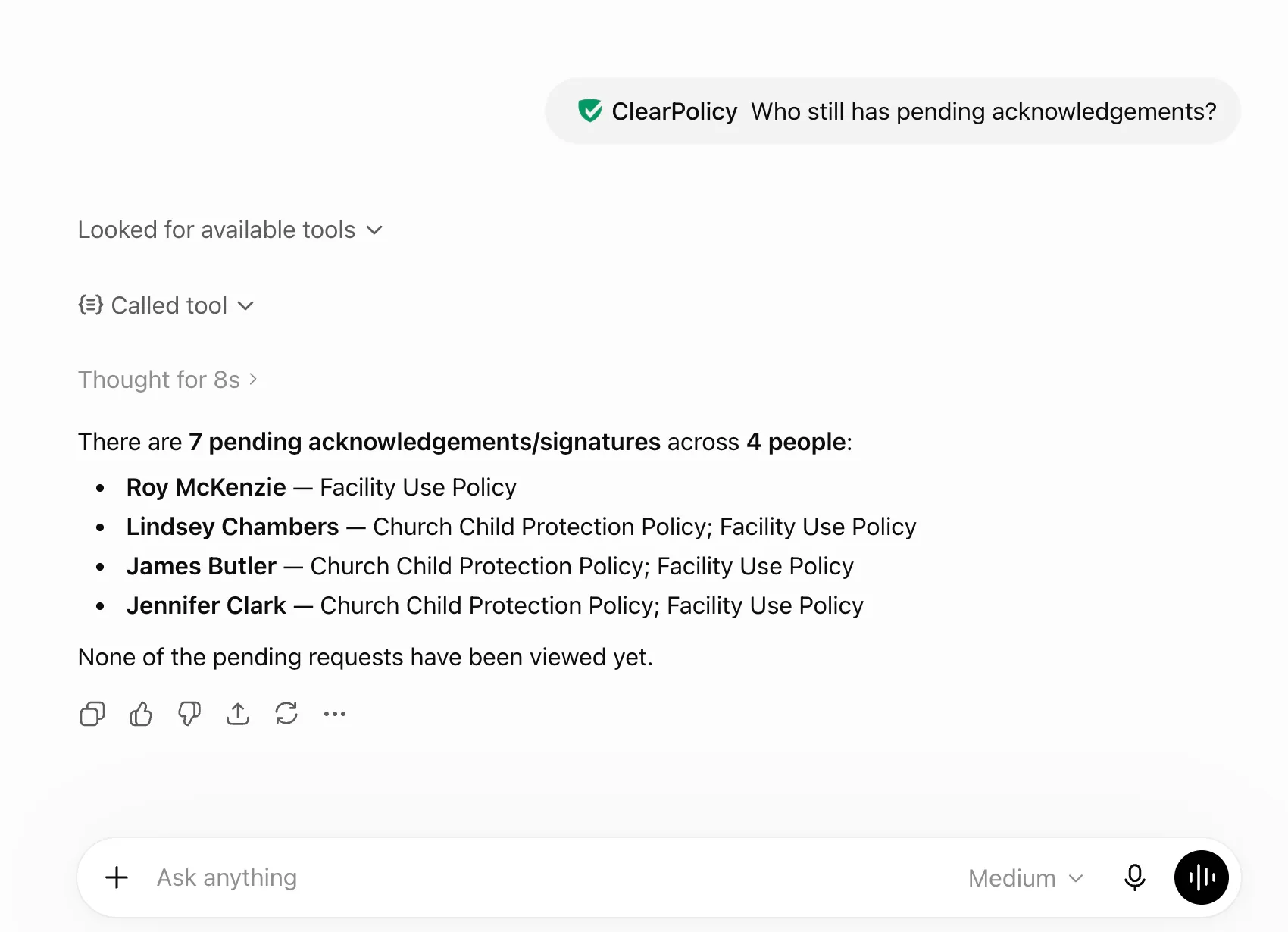
TL;DR: ClearPolicy is now available in the ChatGPT Apps library. Install the app, connect your organization, and ask who still needs to acknowledge a policy, send a document request, or send reminders — in plain language.
If you already use ChatGPT for drafting emails, summarizing meeting notes, or answering quick admin questions, you do not need another tab open to check policy sign-off status.
ClearPolicy helps small businesses, nonprofits, and churches send policies, collect typed electronic signatures, and keep an audit-ready record of who signed what and when. With the ChatGPT app, you can do much of that work from the conversation you are already in.
What you can ask ChatGPT to do
Once you install ClearPolicy and connect your organization, try prompts like:
Who still has a pending acknowledgment request for the code of conduct?Send our volunteer policy to everyone tagged volunteers.Send reminders to anyone with an outstanding request for the employee handbook.Has Sarah Jones signed the data privacy policy?These are the same workflows you would run inside ClearPolicy — send document requests, check completion status, send reminders, and review who still needs to sign. The difference is you describe what you need instead of clicking through screens.
How to install and connect
- Open ClearPolicy in the ChatGPT Apps library and install the app.
- Sign in to ClearPolicy when ChatGPT prompts you to approve access.
- Return to Settings → AI assistants in ClearPolicy to confirm you are connected.
Each team member connects their own ChatGPT account. Access applies to whichever organization you have selected in ClearPolicy when you authorize the connection.
If your plan does not support ChatGPT Apps yet, you can still connect manually with a custom MCP connector. See our MCP setup guide for connection details.
Who this is for
This is especially useful if you are the person chasing signatures:
- Small business office managers checking handbook acknowledgments before onboarding week
- Nonprofit operations leads tracking board and volunteer policy sign-offs
- Church administrators following up on child safety or volunteer policies
You still upload policies, manage people, and review compliance reports in ClearPolicy. ChatGPT is a faster way to ask routine questions and trigger common actions.
New to ClearPolicy?
If you do not have an account yet, start a free 30-day trial — no credit card required. Upload a PDF, add your people, send your first document request, then connect ChatGPT when you are ready.
Try ClearPolicy free for 30 days →For a full walkthrough of supported actions, see Connect ChatGPT and Claude in our documentation.
Try policy sign-offs from ChatGPT
Upload policies, send document requests, track who signed, and connect ChatGPT when you are ready — free for 30 days, no credit card required.
No credit card required.